




Designed Around the Real Emotions of Daily Corporate Commuting in India
Behind every transport ticket is a real person - an analyst trying to catch her 8:15 AM pickup before a client call, a working parent leaving Gate 2 at 6:00 PM, or a night-shift engineer stepping inside her apartment gate at 2:30 AM. Good software removes anxiety at every step.

No More Crowded Gate Confusion or Searching for Cab Numbers
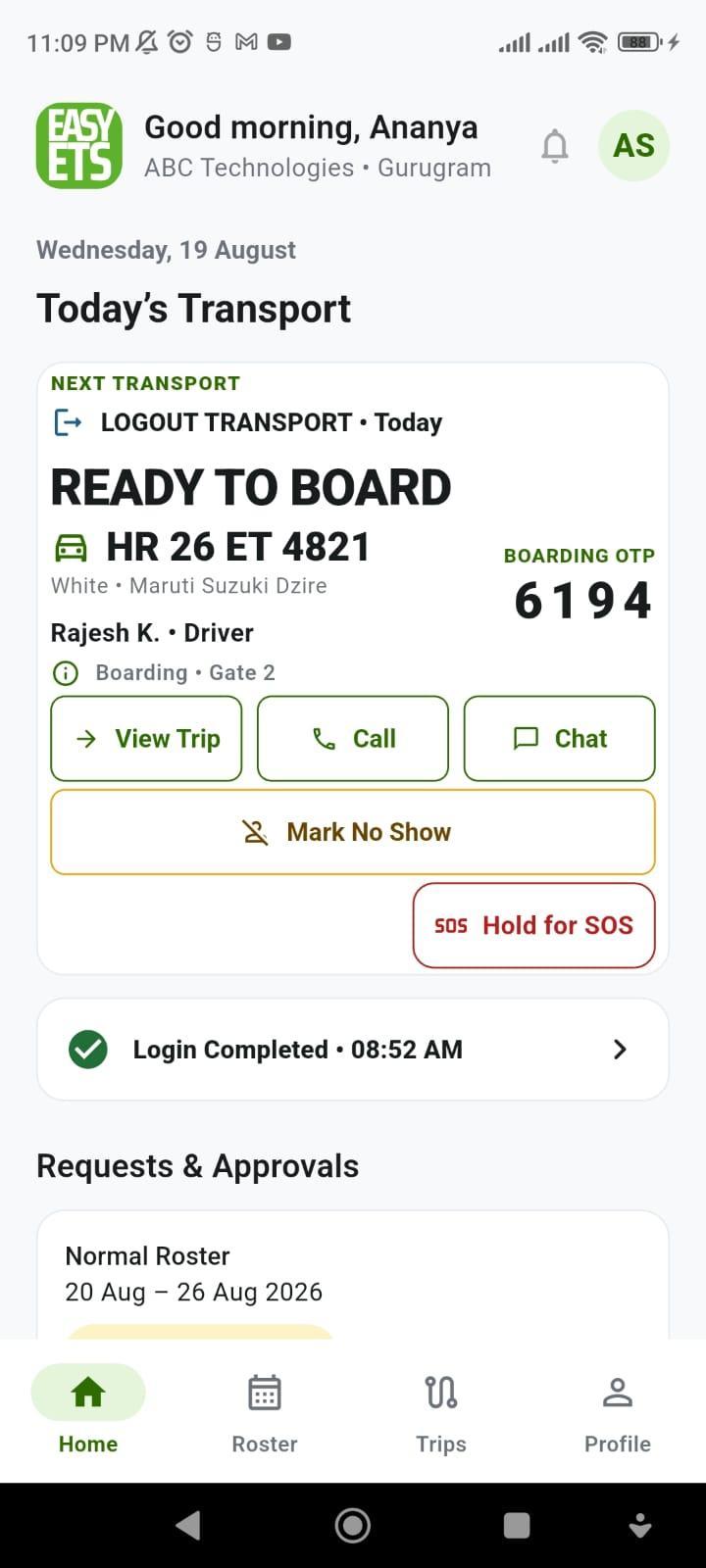
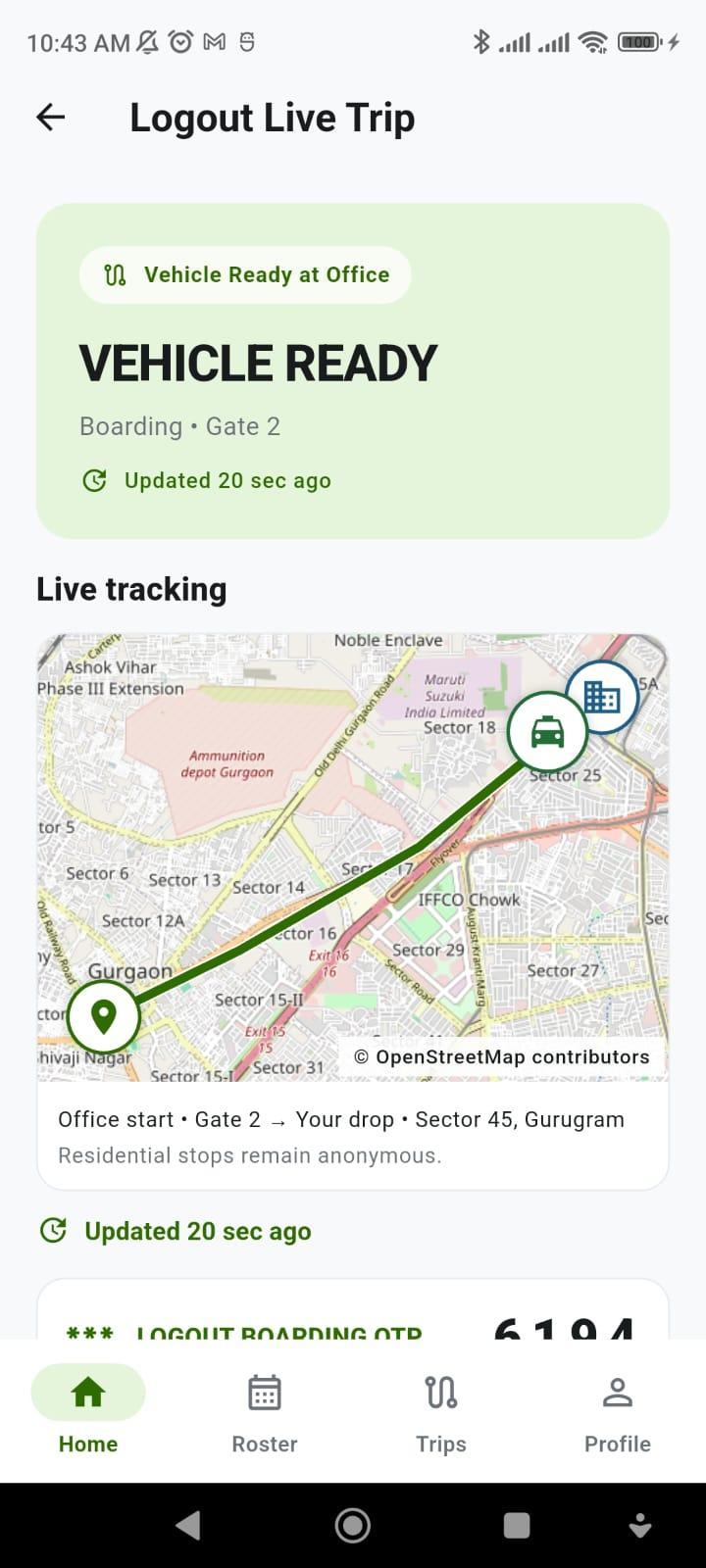
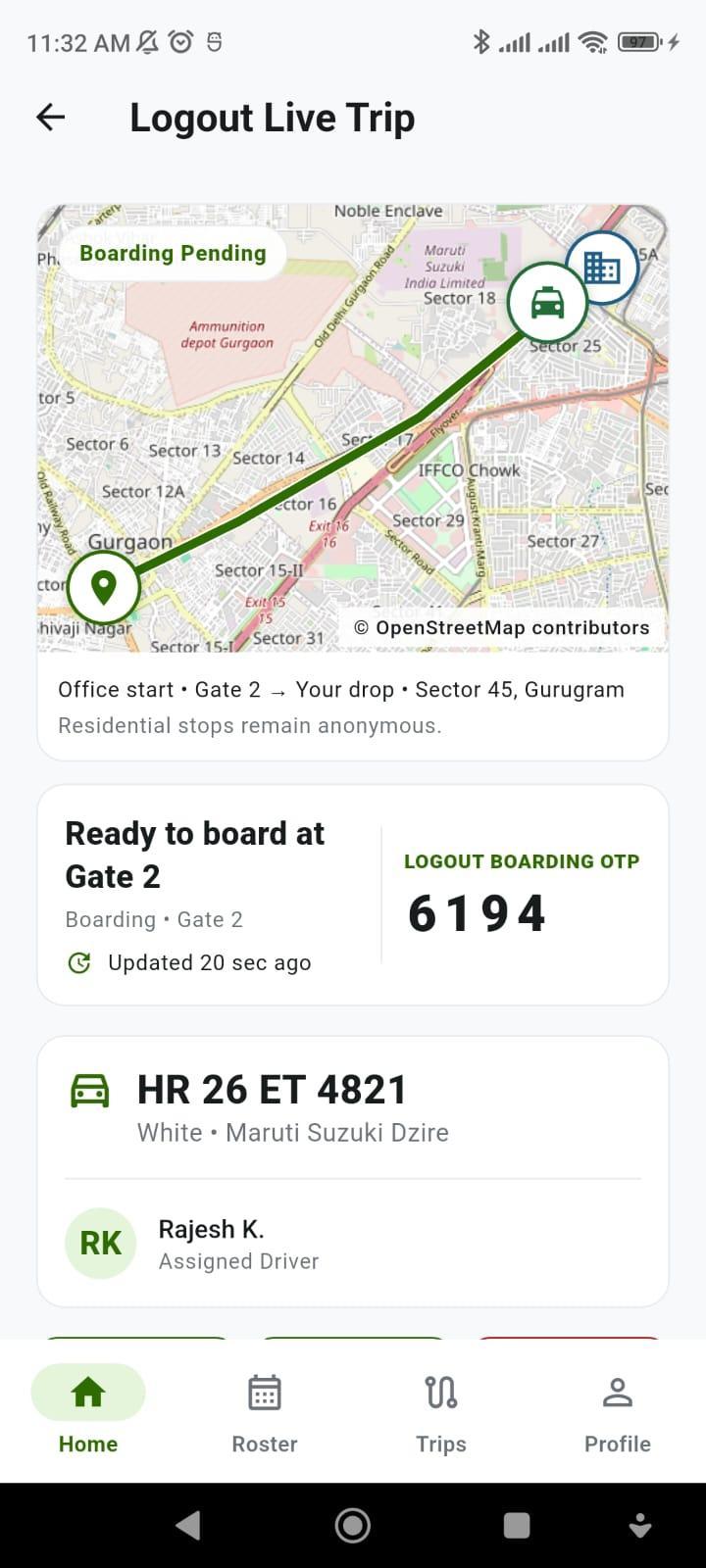
When 40 cabs line up outside a Gurugram or Bengaluru tech park at shift logout, employees don't need to call dispatchers or read paper sheets. Their phone shows the exact gate (Boarding • Gate 2), vehicle number, driver name, and a stage-locked 4-digit Boarding OTP.

Every Late-Night Journey Ends with a Verified "Safe Reach"
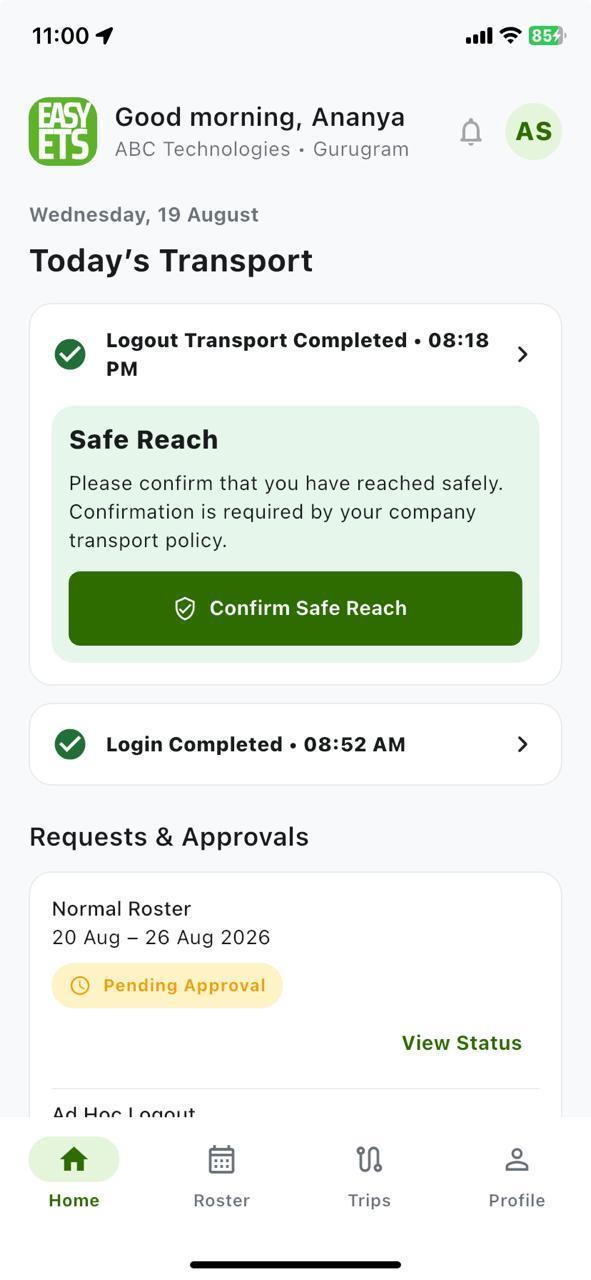
During a night drop, co-travellers' home addresses stay private, personal phone numbers remain masked, and the 3-second Hold for SOS button stays within thumb reach. Once home, one tap on Confirm Safe Reach closes the safety loop for both the employee and the security desk.
1. Private Sign-In & Governed Home Location Lock
In many basic cab apps, anyone can see a dropdown of client company names on the login screen - or worse, employees can edit their home address freely every evening to get dropped at a friend's house or shopping mall. Easy ETS blocks both risks by design.
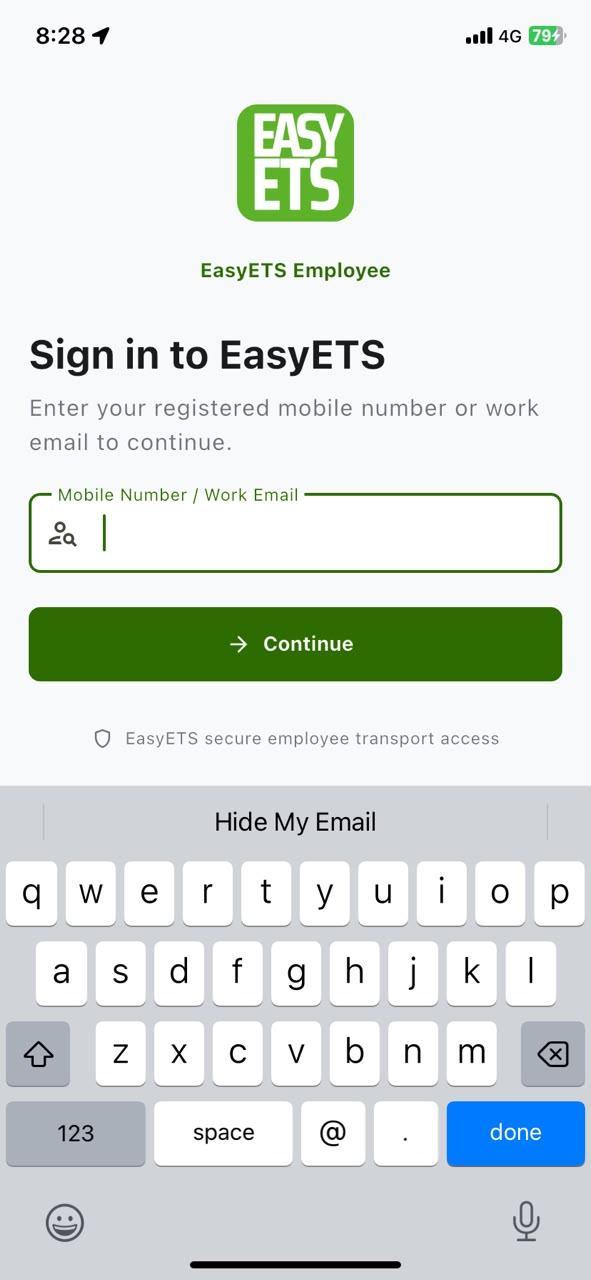
01. Private Account Discovery
Employees enter only their registered Mobile Number or Work Email. No company code or client tenant list is ever exposed publicly before sign-in. Backend policy automatically routes to Password, OTP, or Corporate SSO.
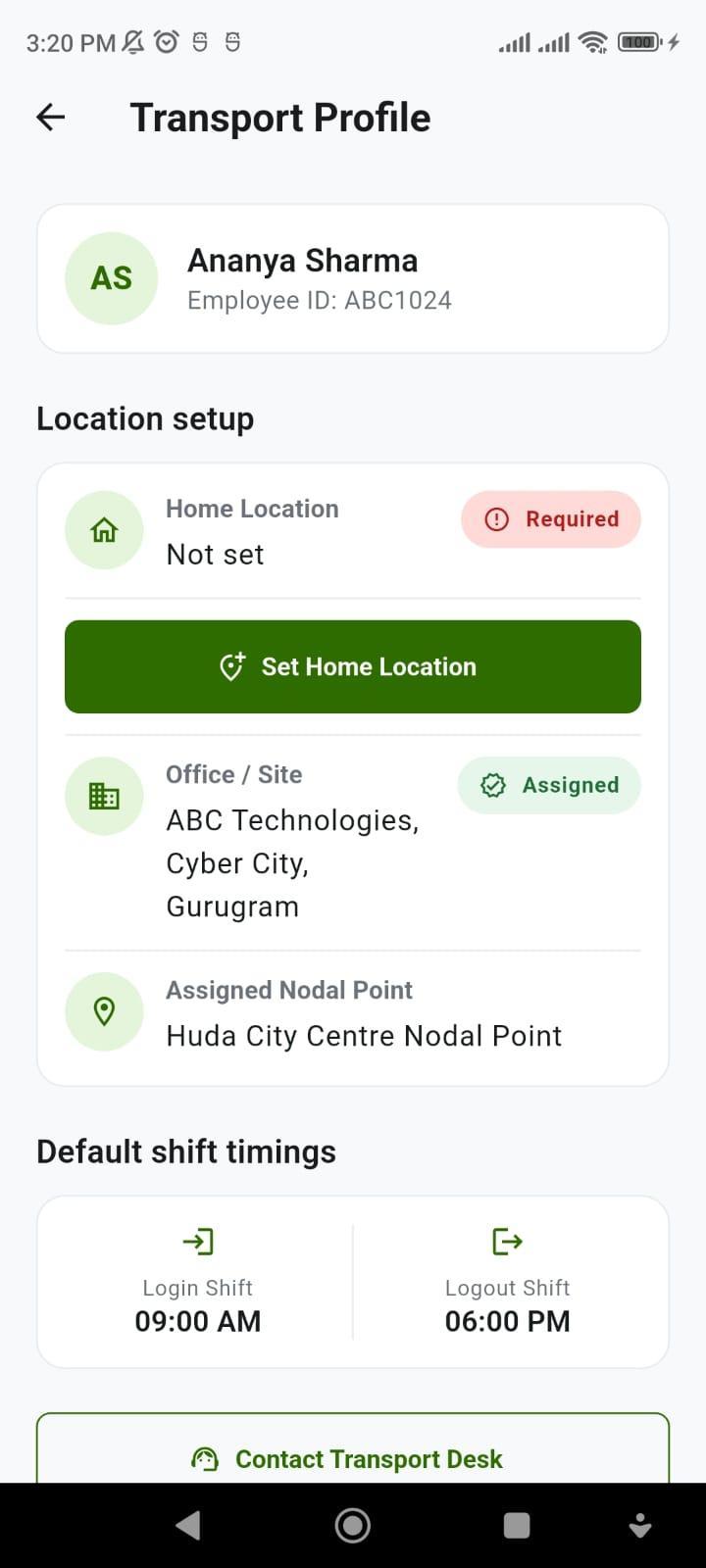
02. First-Time Home Pin Capture
On first login, the app prompts the employee to set their actual pickup/drop geo-point while keeping their assigned Office Site, Nodal Point, and default shift timings strictly read-only.
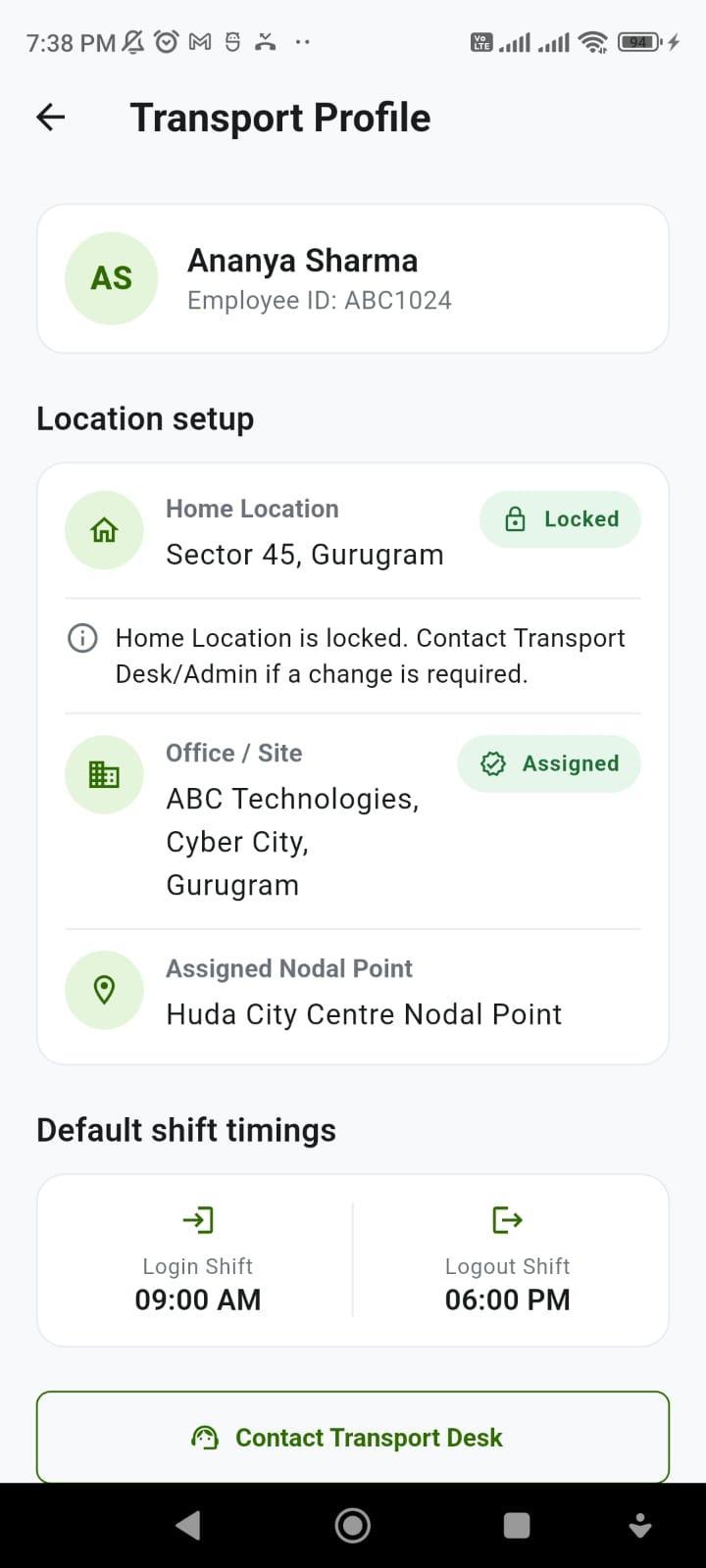
03. Locked Transport Profile
Once confirmed, the Home Location is Locked. There is no unrestricted "Edit Address" button - guaranteeing that Roster, Ad-Hoc, and Live Trip flows all use the exact same verified home coordinates.
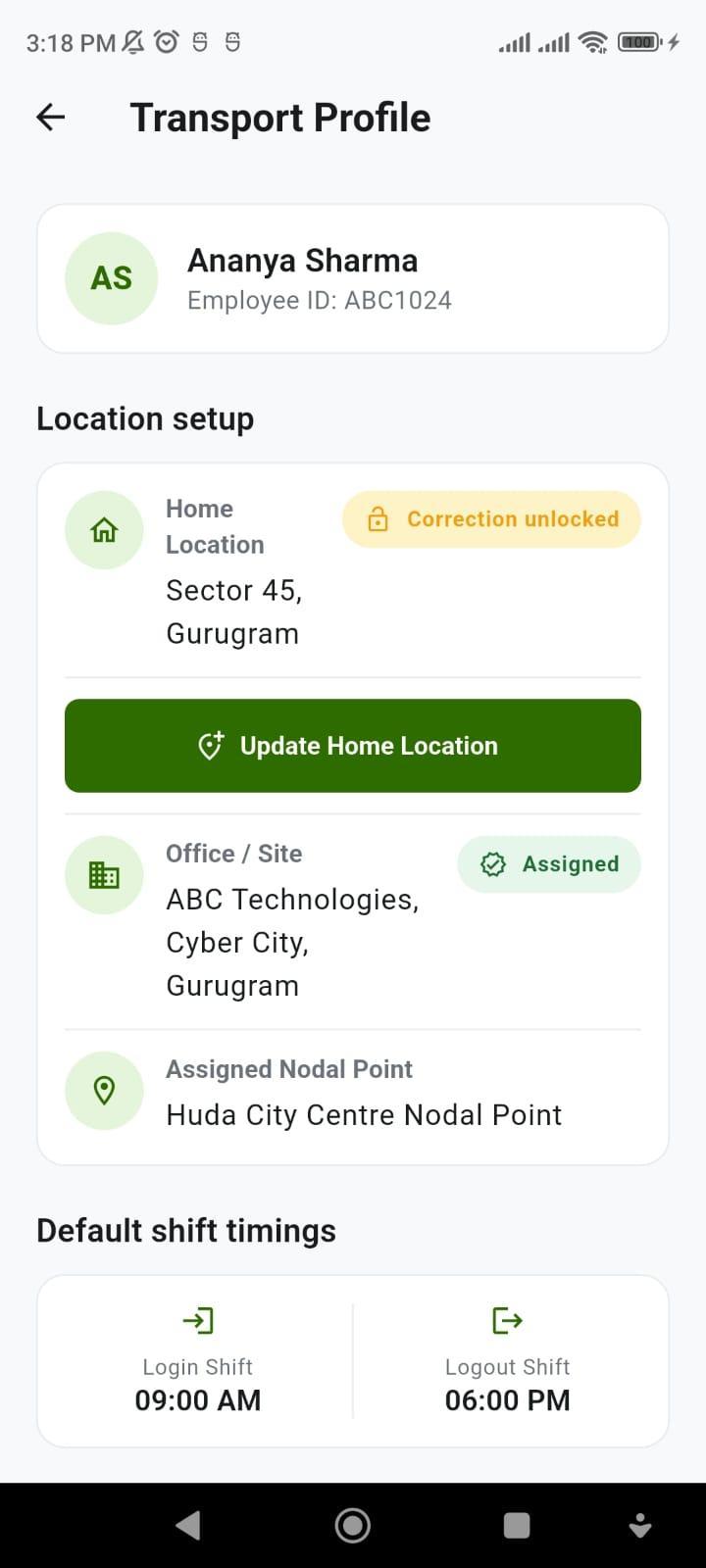
04. Policy-Driven Relocation Unlock
When an employee genuinely moves to a new home or PG, the Transport Desk temporarily unlocks location correction from the admin portal. Once the employee submits the new pin, it automatically locks again.
2. Glance-First Home Cockpit: Cut-Off Cancel vs. Audited No-Show
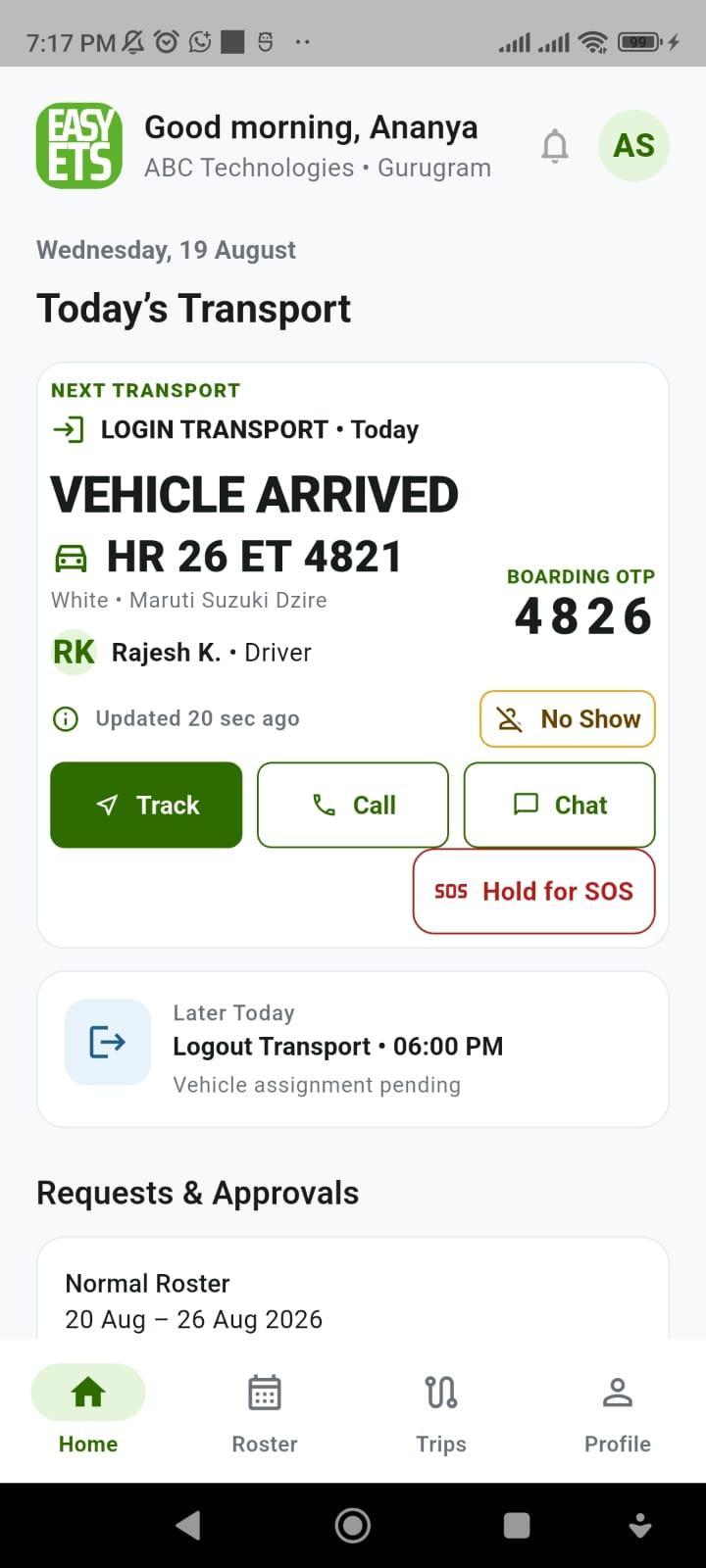
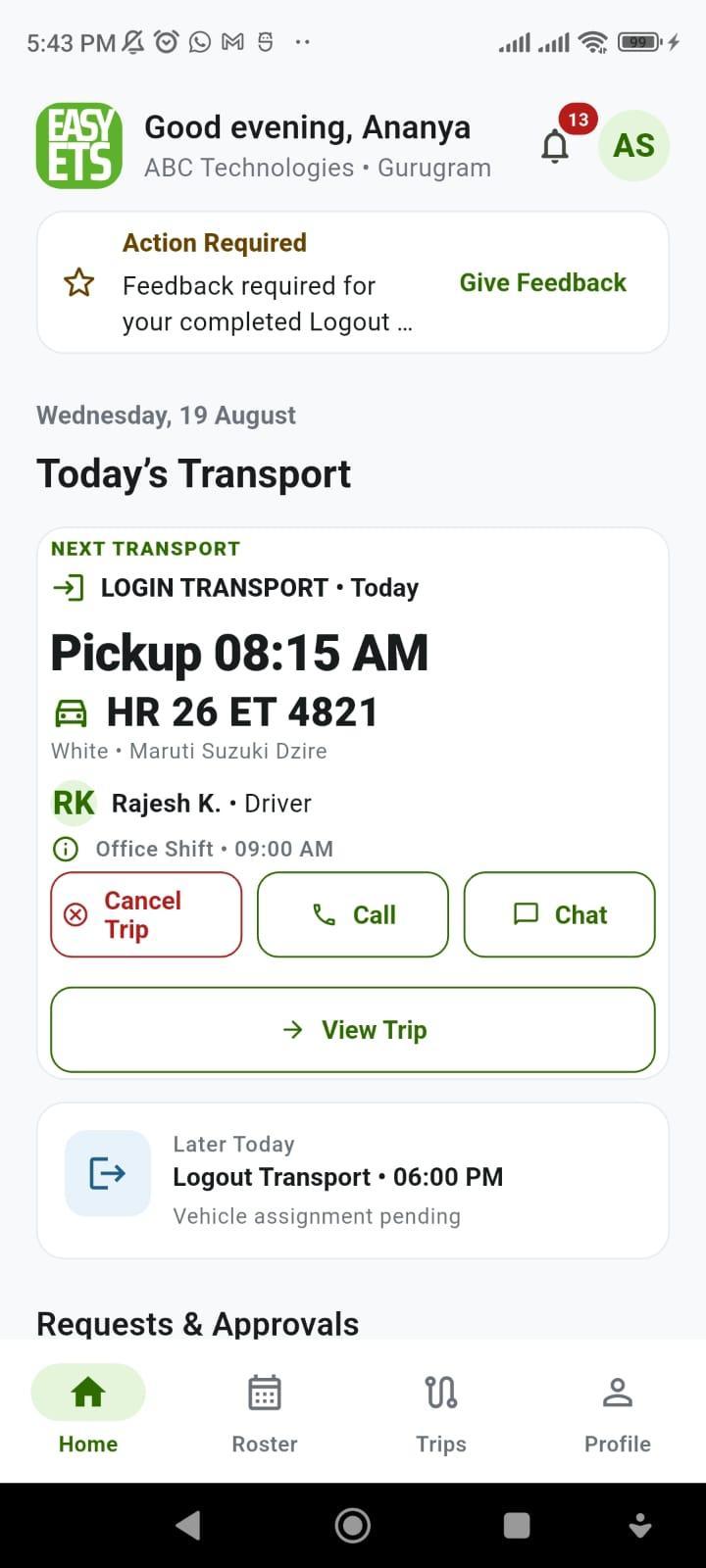
Employees should not have to dig through menus to find their cab or figure out how to cancel when they fall sick. The Home screen shows one dominant Next Transport card that automatically adapts to your company's cut-off rules and trip stage.
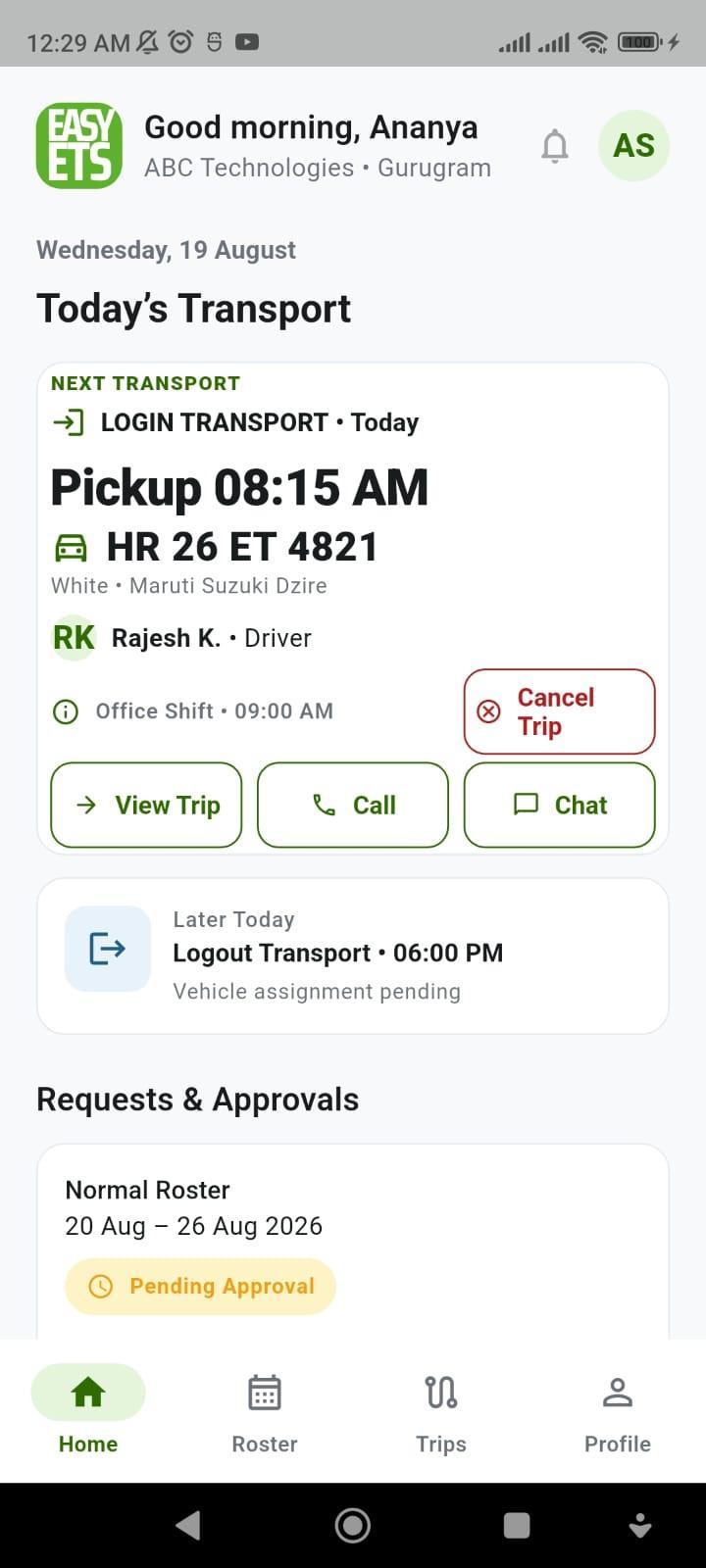
01. Before Cut-Off: Cancel Trip
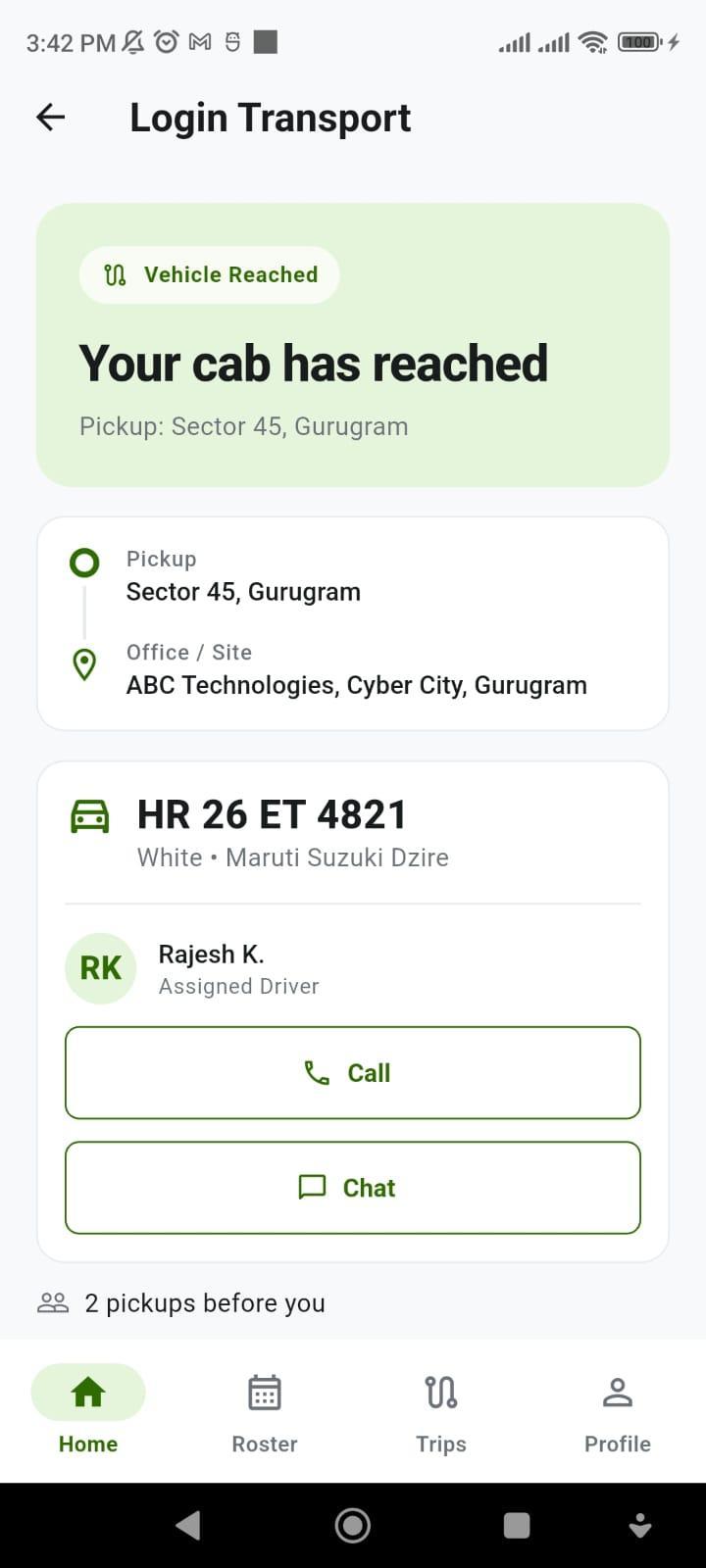
Before the shift cancellation cut-off window closes, employees see a clear Cancel Trip button along with their pickup time, cab number (HR 26 ET 4821), and driver name - letting the travel desk optimize routes early.
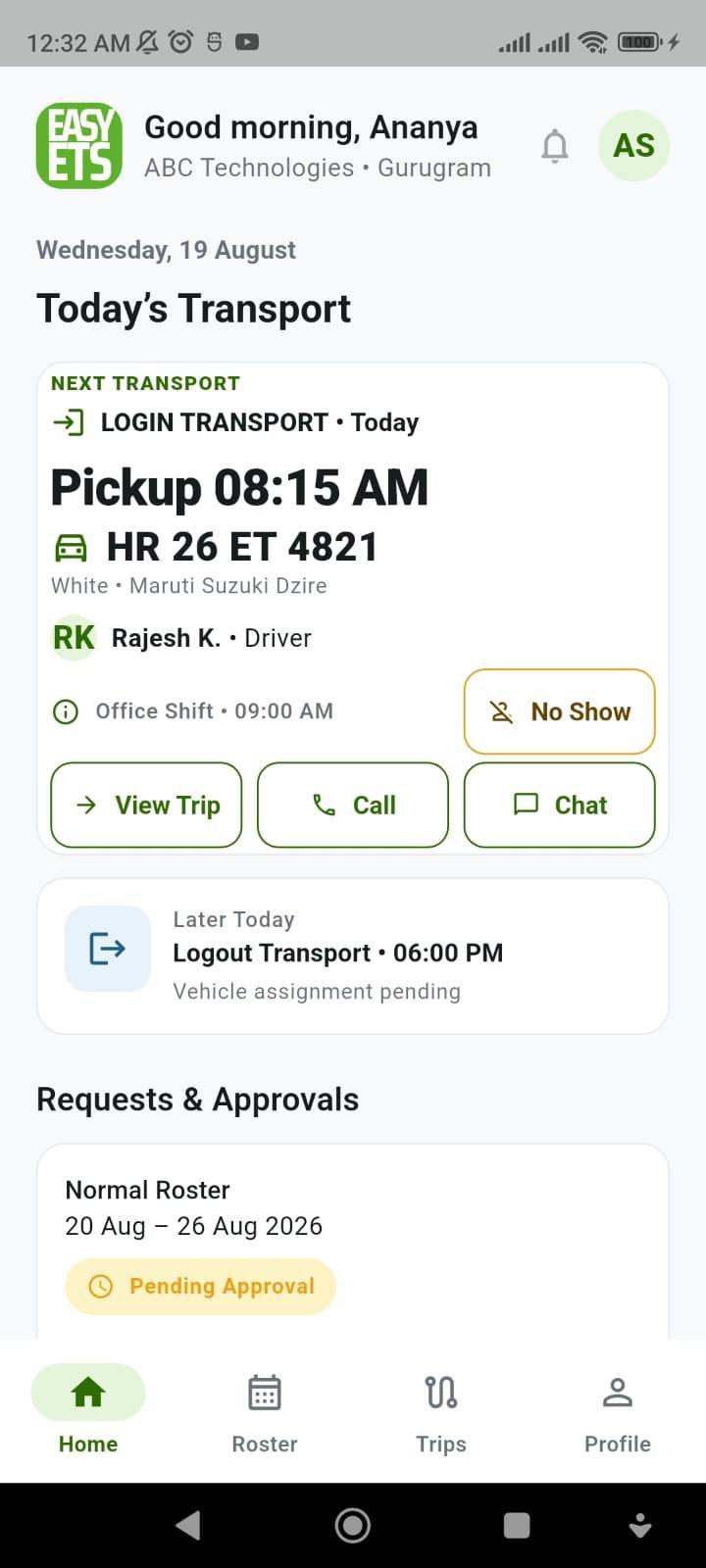
02. After Cut-Off: Mark No Show
Once the cut-off time passes, Cancel Trip disappears and is replaced by No Show. Cancel and No-Show are mutually exclusive, giving the transport desk an accurate operational record for vendor billing.
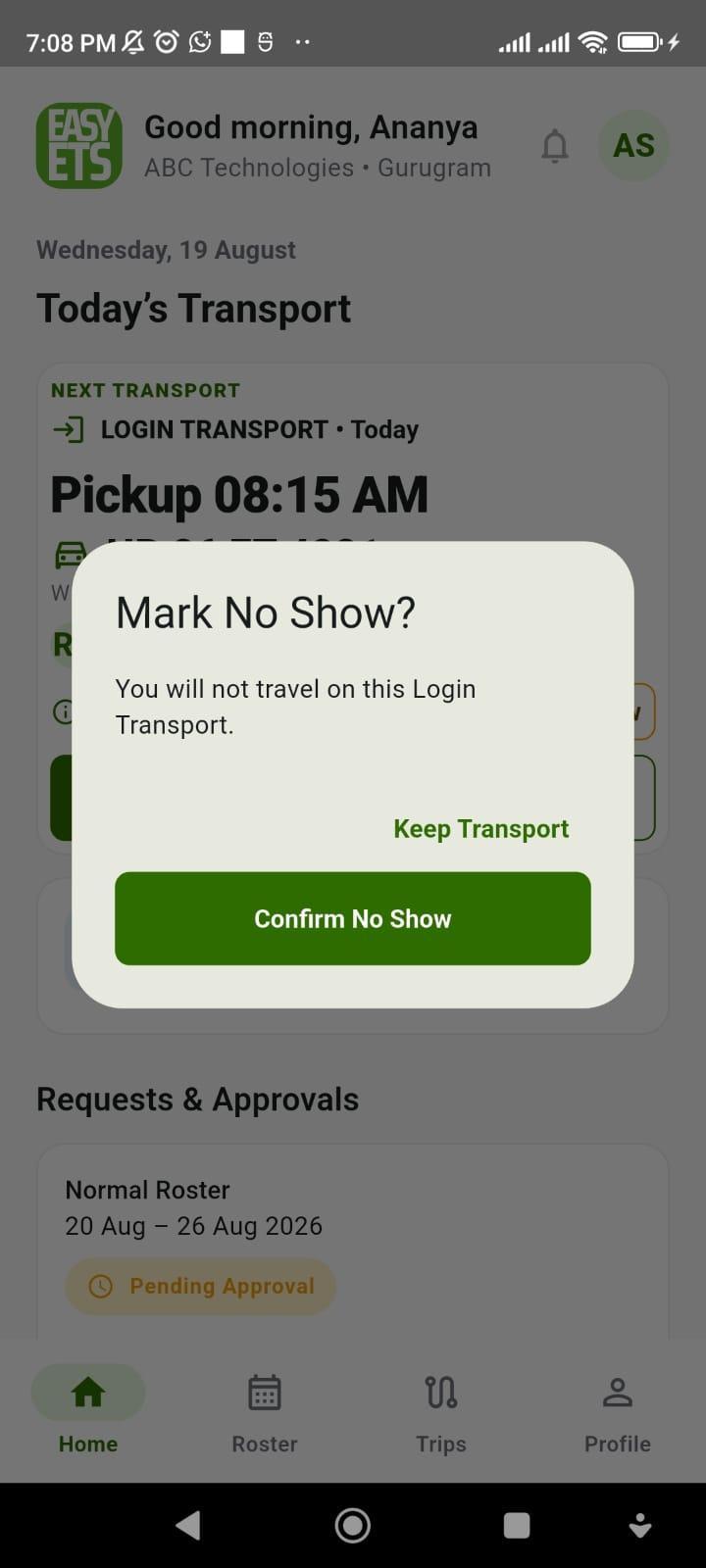
03. Protected No-Show Confirmation
A dedicated confirmation prompt ("Keep Transport" vs. "Confirm No Show") prevents accidental taps - and closes only the selected Login direction without cancelling the employee's evening Logout cab.
04. Automatic Logout Promotion
As soon as the morning Login trip finishes (Login Completed • 08:52 AM), the Home cockpit automatically promotes the evening Logout Transport card (Ready to Board • Gate 2) to the top of the screen.
3. Plan 1, 7, 15, or 30-Day Rosters in Seconds (With 1-Date Exception Editing)
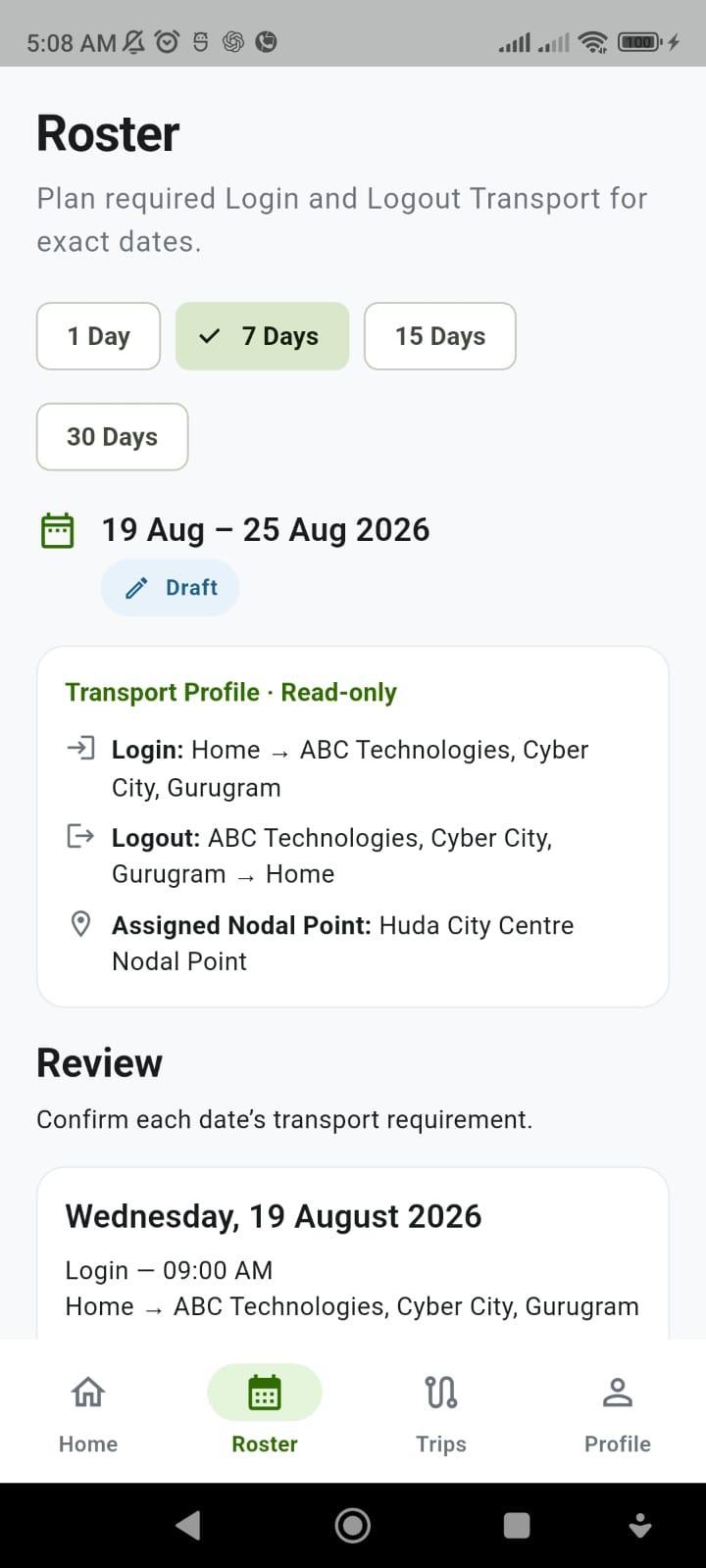
In 24x7 BPO, ITES, and GCC operations, forcing employees to fill out 30 individual days from scratch leads to mistakes and missed cut-offs. Easy ETS lets employees copy their last approved schedule and tweak only the days that changed.
01. Flexible 1 / 7 / 15 / 30-Day Ranges
Employees switch between 1-Day, 7-Day, 15-Day, or 30-Day views and select only from company-permitted fixed Login and Logout shift times (no free-text timing mistakes).
02. "Use Last Approved Roster"
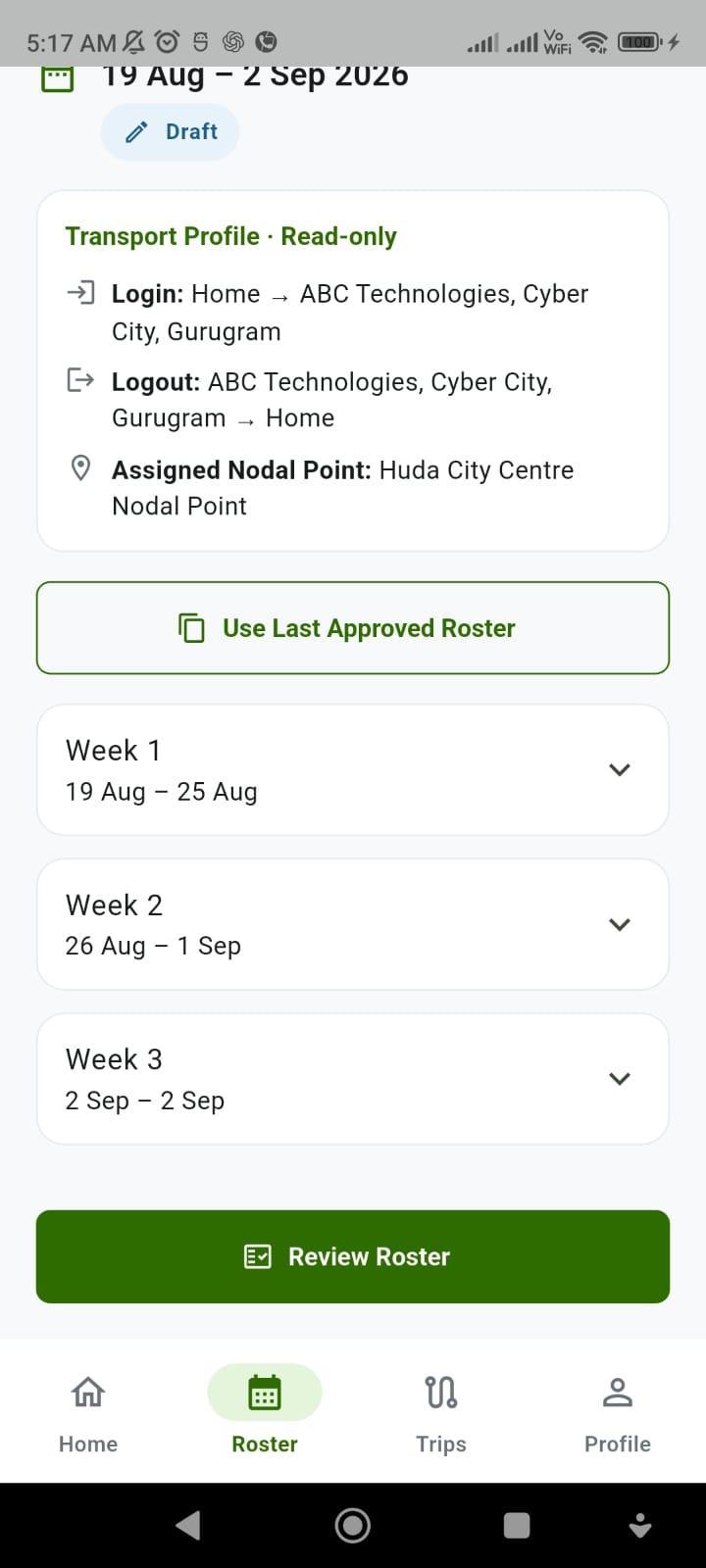
For 15-day or 30-day planning, one tap on Use Last Approved Roster pre-fills the entire period into clean weekly sections so employees only expand the week they need to adjust.
03. Single-Date Exception Editor
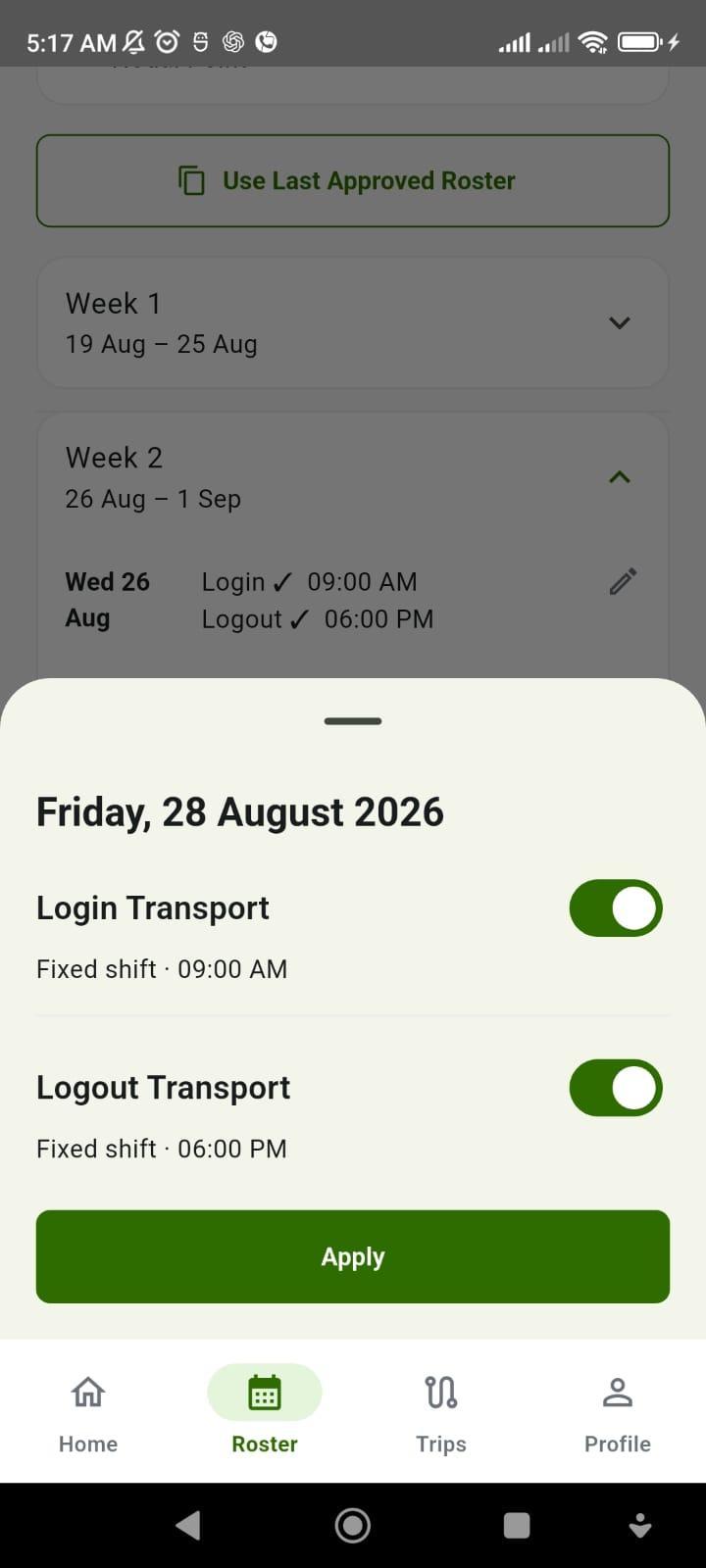
Taking Friday off or working a different shift on Tuesday? The employee opens just that single date, toggles Login or Logout ON/OFF, and applies - leaving the rest of the week untouched.
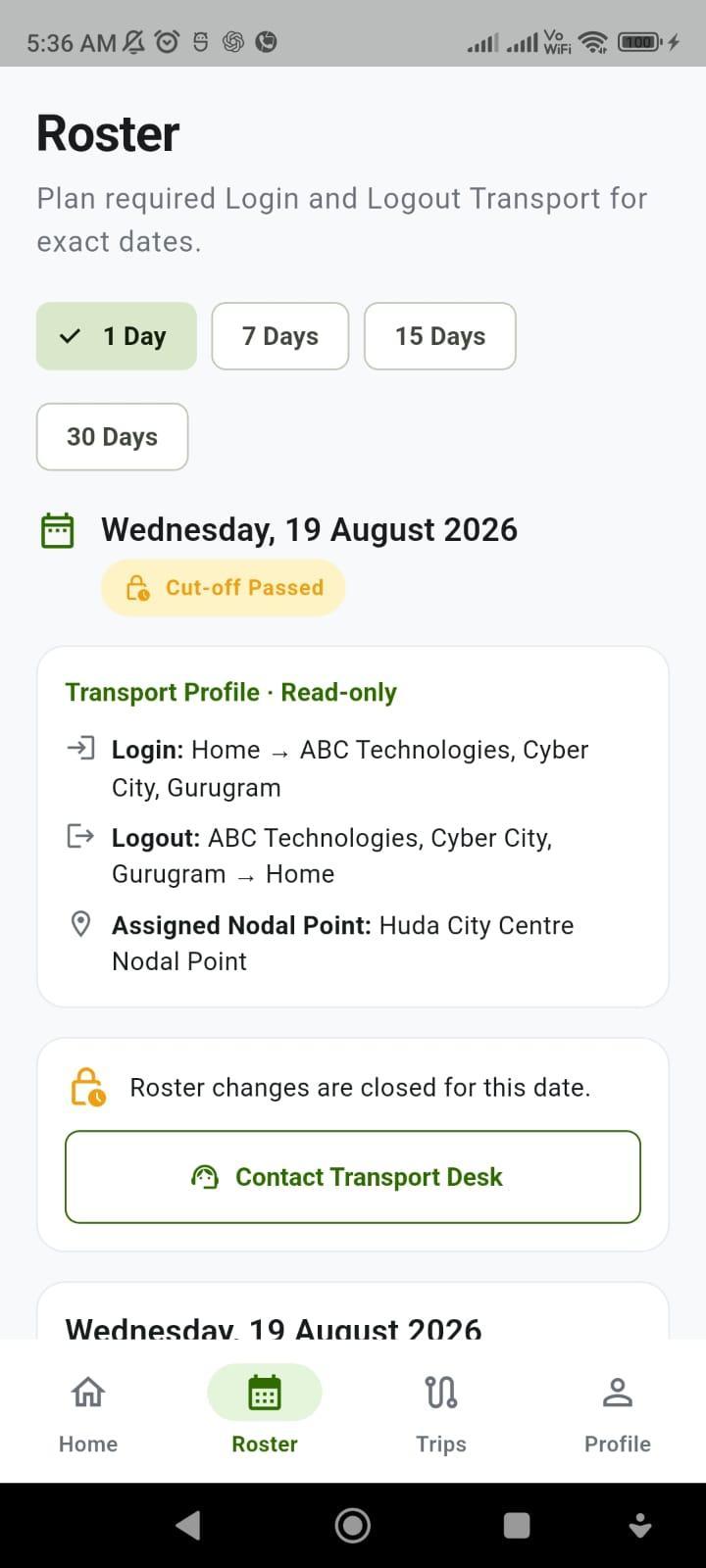
04. Strict Cut-Off Lock & Audit ID
Once approved (Roster Reference ID), the record is immutable for audit compliance. When the tenant cut-off time passes, the screen displays a clear Cut-off Passed lock with a direct Contact Transport Desk button.
4. One-Time Ad-Hoc Cab Requests with Two-Stage Approval Visibility
When an employee works late for a production release or needs an unscheduled pickup, WhatsApp messages and email chains create chaos. Worse, employees often think their cab is booked the moment their manager says "yes." Easy ETS separates Manager Approval from Vendor Vehicle Confirmation on a live 3-step tracker.
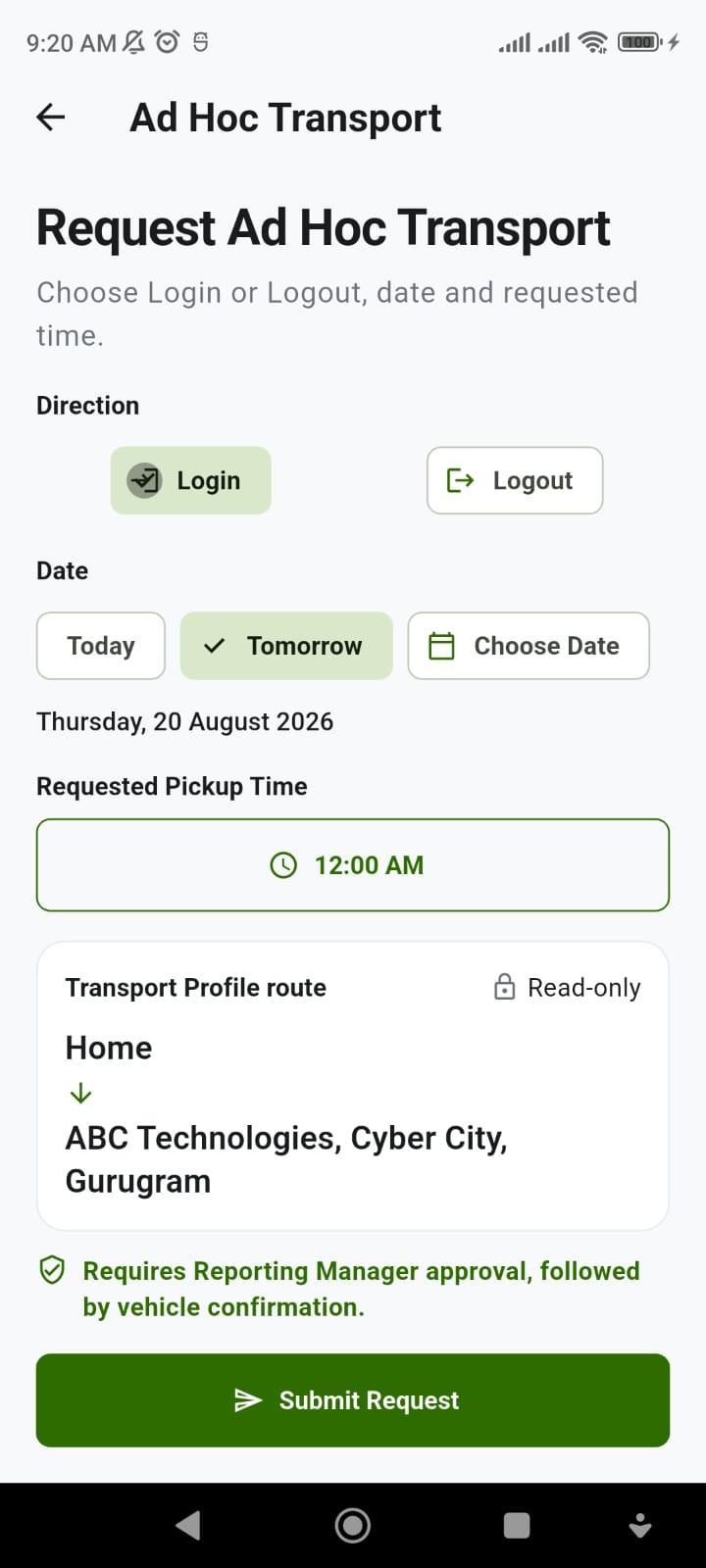
01. Single-Screen Ad-Hoc Request
Employees pick Login or Logout direction, date, and requested time on one clean screen using their locked Transport Profile route - no multi-page form friction.
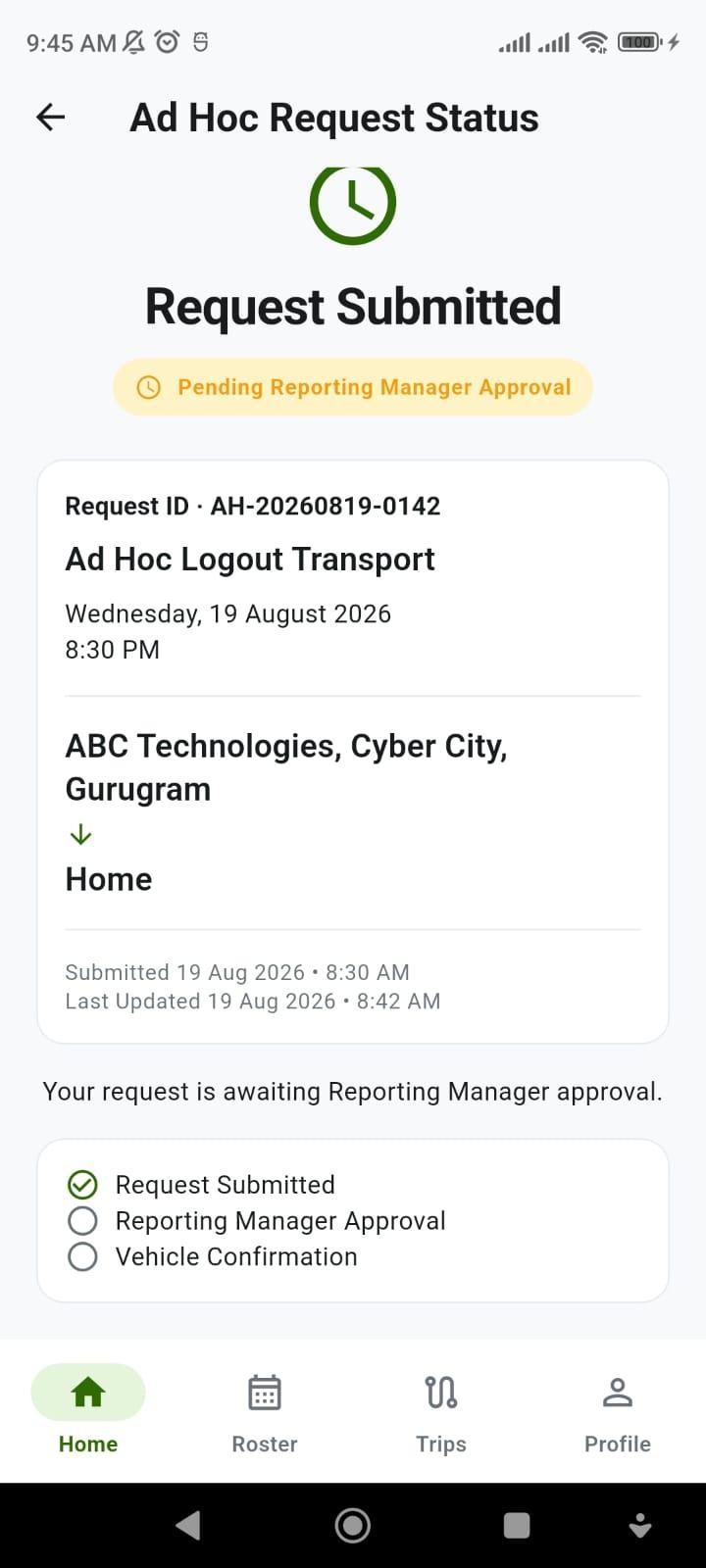
02. Stage 1: Manager Approval
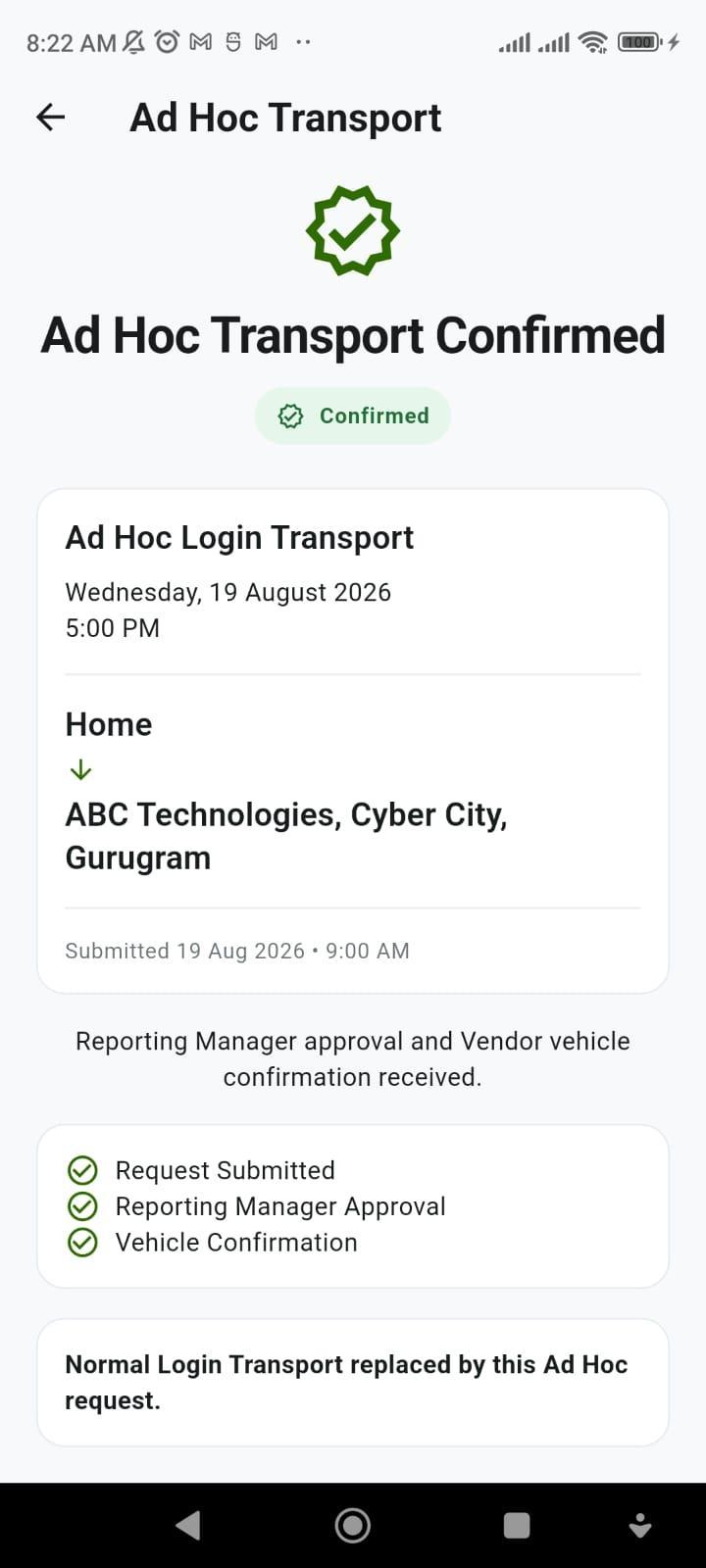
The request generates a unique audit ID (AH-20260819-0142) and shows a 3-step progress checklist waiting at Reporting Manager Approval.
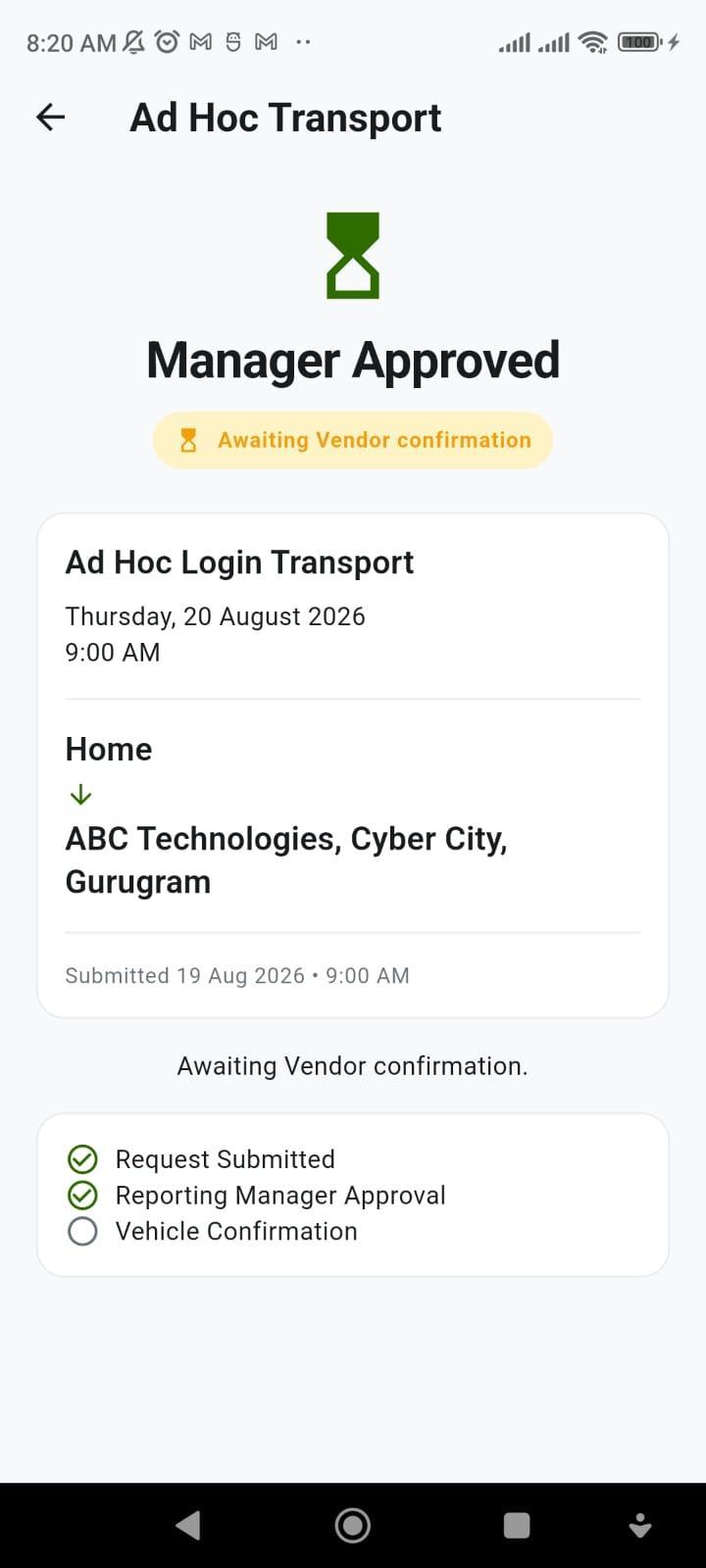
03. Stage 2: Awaiting Vehicle
Once the manager approves, the status updates to Manager Approved • Awaiting Vendor Confirmation - preventing the employee from walking down to the gate before a cab is actually assigned.
04. Stage 3: Confirmed for Execution
When the travel desk or vendor allocates the cab, all three green checks complete (Ad Hoc Transport Confirmed) and the trip seamlessly enters the live Home cockpit without overwriting the opposite shift direction.
5. Privacy-Safe Live Map Tracking, Anonymous Co-Traveller Stops & Masked Calls
Corporate security teams frequently reject consumer-style cab apps for two reasons: they expose female colleagues' home drop addresses on shared route maps, and they demand continuous GPS permissions on employees' personal phones. Easy ETS solves both.
01. "2 Pickups Before You" Counter
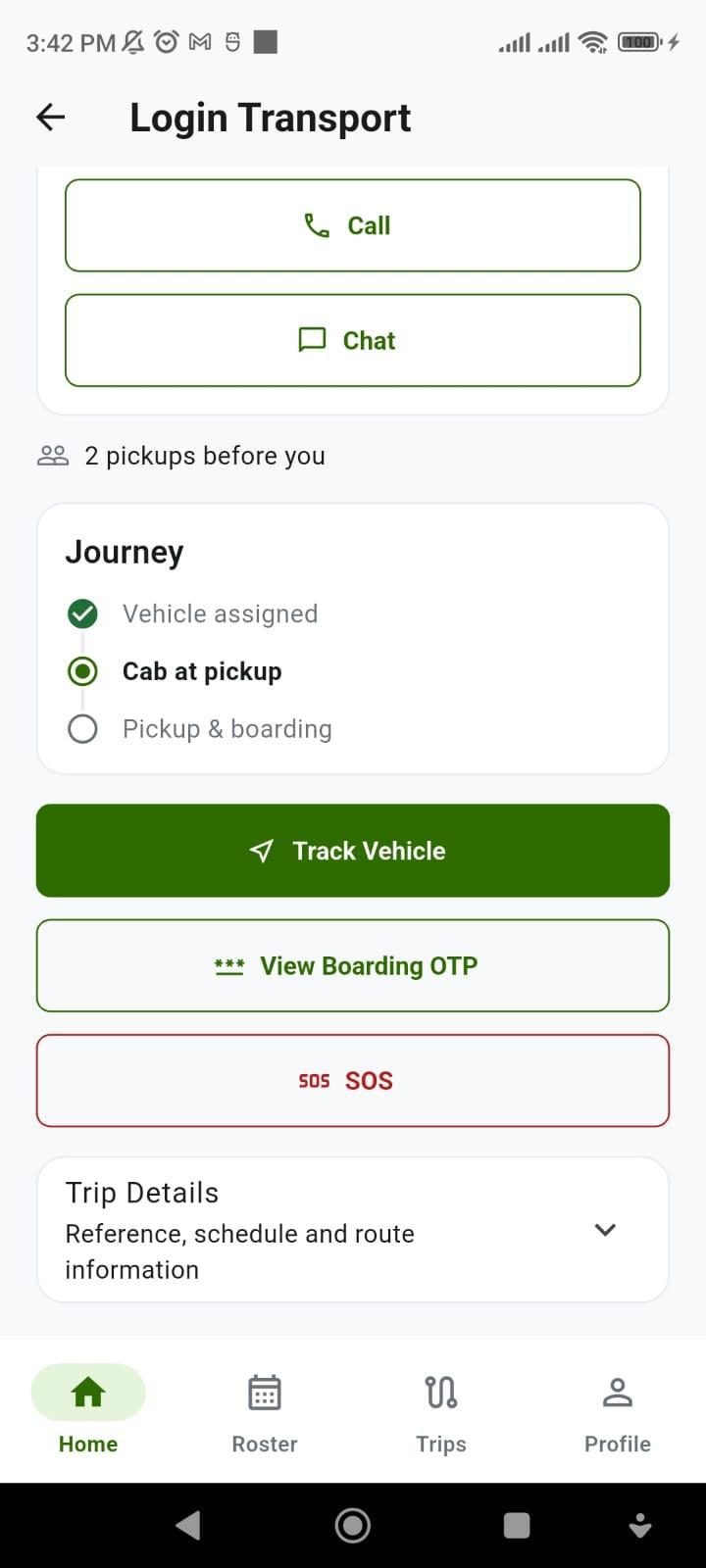
During morning pickups, employees see when their cab is approaching and how many stops remain (2 pickups before you) while other employees' home addresses remain completely hidden.
02. Number-Masked Call & Chat
Employees coordinate with the assigned driver using capability-gated Call and Chat buttons inside the app - without ever exposing personal mobile numbers on either side.
03. Anonymous Co-Traveller Map
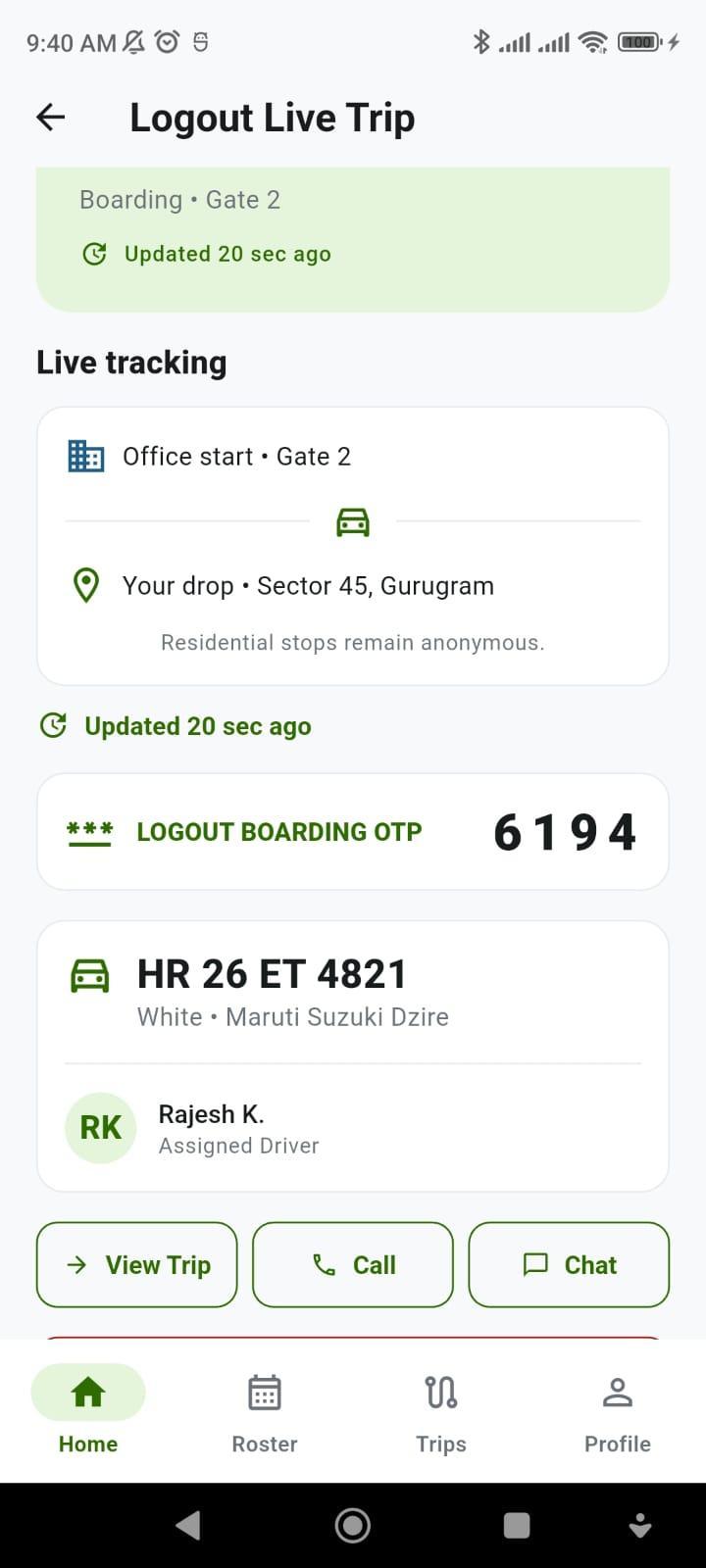
On the live map (Office start • Gate 2 → Your drop • Sector 45), the app explicitly guarantees: "Residential stops remain anonymous." Co-travellers' home pins are never plotted on another rider's screen.
04. Zero Employee Phone GPS Drain
Viewing live cab progress does not require employee location permission or background phone GPS polling - protecting employee privacy and battery life even on 2G/low-data connections.
6. Gate-to-Doorstep Safety: Stage-Locked OTP, 3-Second Hold SOS & Mandatory "Safe Reach"
For late-night drops between 8:00 PM and 6:00 AM, safety controls must be effortless in a real emergency - yet protected against accidental pocket taps during a normal ride.
01. Stage-Locked Boarding OTP
The 4-digit Boarding OTP (6194) is displayed only when the cab is Ready and is scoped to that exact trip and direction. For security, the OTP is never exposed in plain-text push notifications.
02. 3-Second "Hold for SOS"
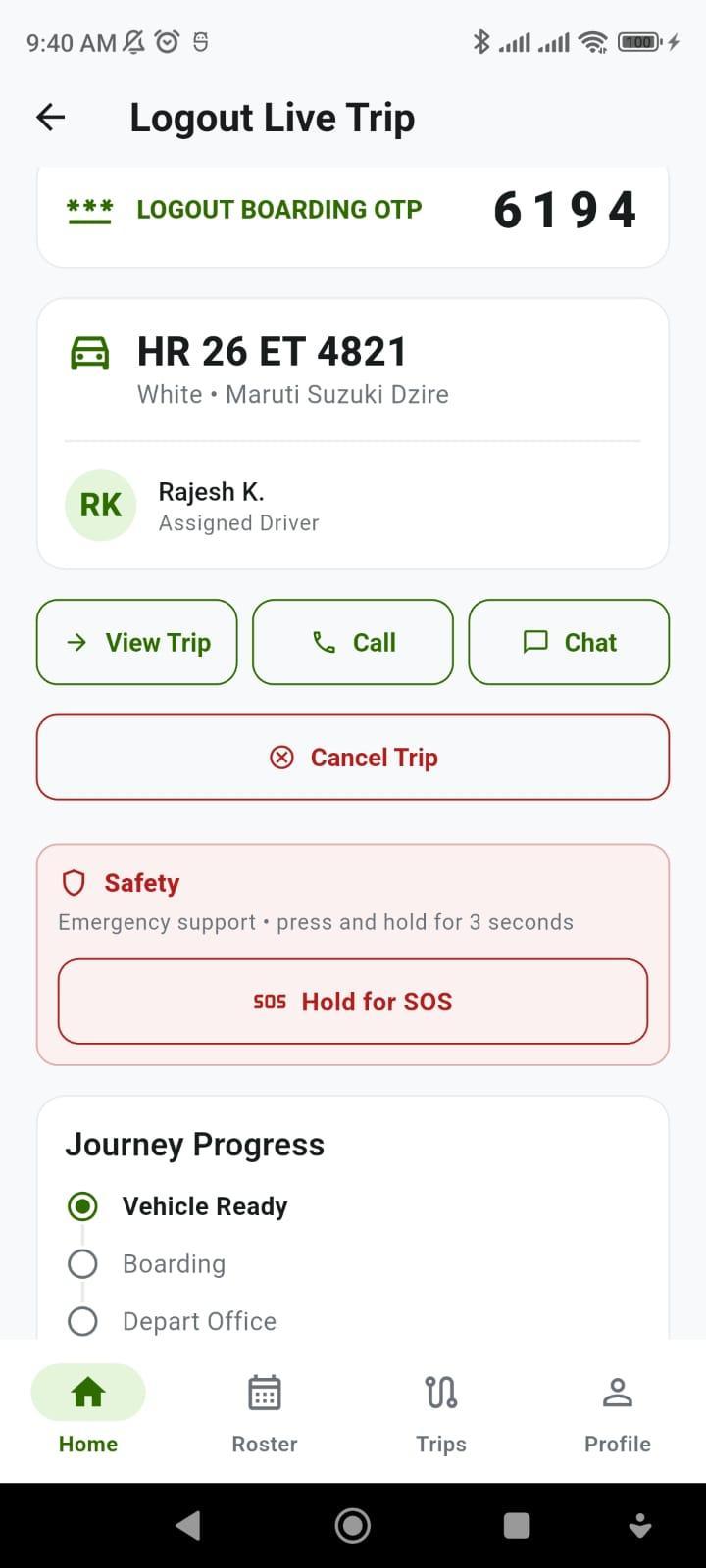
The emergency Hold for SOS button sits in a visually separated safety card. Pressing and holding for 3 seconds triggers an instant alert on the corporate security console without requiring any form fill - while preventing accidental taps.
03. Mandatory "Confirm Safe Reach"
Immediately after an eligible Logout drop completes, the Home screen displays a dedicated Confirm Safe Reach card so the employee confirms safe arrival inside their home gate in one tap.
04. Post-Trip Service Feedback
Once Safe Reach is confirmed, the app prompts for direction-specific trip feedback - giving your transport desk continuous quality ratings on every vendor cab and chauffeur.
Frequently Asked Questions About the Easy ETS Employee App
Key operational, privacy, and compliance answers for Corporate Travel Desks, HR Leaders, and IT Security Teams
Can employees change their home pickup or drop location whenever they want in the Easy ETS Rider App?
No. To prevent unapproved route detours and billing leakage, the employee's Home Location geo-pin is locked immediately after initial setup. An employee can only update their home pickup/drop point when the Corporate Travel Desk or Admin temporarily unlocks location correction in the portal.
How does the app handle shift cab cancellations before and after the roster cut-off time?
Before your company's configured cut-off window, the app shows a Cancel Trip button so the travel desk can adjust cab grouping early. Once the cut-off time passes, Cancel Trip is automatically replaced by Mark No Show (with a confirmation dialog), recording an auditable operational outcome without cancelling the employee's return trip.
How do employees plan weekly or monthly shift rosters without repeating data entry?
Employees can plan 1-Day, 7-Day, 15-Day, or 30-Day rosters. Using the Use Last Approved Roster button, they copy their previous schedule in one tap and edit only single-date exceptions (such as a Friday leave or shift swap) before reviewing and submitting.
How does Ad-Hoc cab booking approval work in the Easy ETS Employee App?
Ad-hoc requests follow a transparent 3-step tracker: (1) Request Submitted, (2) Reporting Manager Approval, and (3) Vendor Vehicle Confirmation. This prevents employees from assuming a cab is waiting at the gate merely because their reporting manager approved the request.
Does live cab tracking expose co-travellers' home addresses or drain employee phone battery?
No. The Easy ETS Rider App tracks the assigned cab, not the employee's phone GPS - so it requires no employee location permission and does not drain battery. Co-traveller stops remain completely anonymous ("2 pickups before you" and "Residential stops remain anonymous"), and Call/Chat buttons never reveal personal mobile numbers.
Can the Easy ETS Employee Rider App be white-labelled under our enterprise or fleet brand?
Yes. The Easy ETS Rider App is available immediately on Google Play and the Apple App Store, and can also be deployed as a white-labelled iOS and Android application with branded SMS, Email, and WhatsApp notifications under your company's identity.


 9999-42-92-72, 011-69-65-66-80


